


The Crestron TS-1080 tabletop touch screen is ideal for residential and enterprise applications. The TS-1080 features a 10.1 in. (257 mm) capacitive touch screen display with custom programmable control buttons and support for HTML5-based custom UI projects. PoE and Wi‑Fi® network connectivity and a comprehensive assortment of mounting accessories simplify new and retrofit installations.
Advanced Touch Screen Control
The TS-1080 offers a sleek and powerful user interface for controlling technology in a home, boardroom, conference room, or command center. The touch screen provides an intuitive interface with easy-to-use capacitive controls, true feedback, and real-time status display. A built-in proximity sensor wakes the screen without requiring any user interaction, and automatic brightness controls ensure optimal visibility under varying lighting conditions.
Custom-Programmable Virtual Buttons
The TS-1080 comes preconfigured with virtual buttons for Power, Home, Lights, Up, Down, and Microphone. Each button can be programmed via a Crestron control system to provide custom functionality, and unused buttons can be hidden individually. The universal status bar is expanded or hidden using simple swipe gestures on touch screen display.
Dynamic User Interfaces
The TS-1080 supports custom user interfaces created with Crestron HTML5 User Interface and Crestron Construct™ technologies, allowing greater flexibility for UI developers and programmers.
- Crestron HTML5 User Interface enables UI designers to develop rich, front-end user interfaces with increased reusability and efficiency using modern web methodologies. Development tools are provided to simplify creating user interfaces built on standard web technologies
- Crestron Construct is a cross-platform developer application that enables programmers to create HTML5‑based user interfaces within a WYSIWYG (What You See Is What You Get) environment to further simplify UI development.
Streaming Video
Native support for H.265, H.264, and MJPEG formats allows the TS-1080 to display live streaming video from an IP camera or streaming encoder (Crestron DM‑TXRX‑100‑STR, or similar). Video is delivered to the touch screen over Ethernet, eliminating the need for extra video wiring.
Rava SIP Intercom
Rava® SIP Intercom Technology enables hands free VoIP communication with other Rava enabled touch screens and door stations. Rava works over Ethernet, supporting 2-way intercom and paging without requiring any special wiring. VoIP phone capability is also possible through integration with a SIP compatible IP phone system or SIP server, allowing hands free telephone functionality complete with speed-dialing, caller ID, custom ringers, and other enhancements. The far-field microphone picks up voice communication even when the user is not directly next to the touchscreen. Built in echo cancellation affords full duplex performance for clear, seamless voice communication using the integrated microphone and speakers. A dedicated mute button keeps conversations private and includes an indicator for added confidence.
Crestron Room Scheduling App
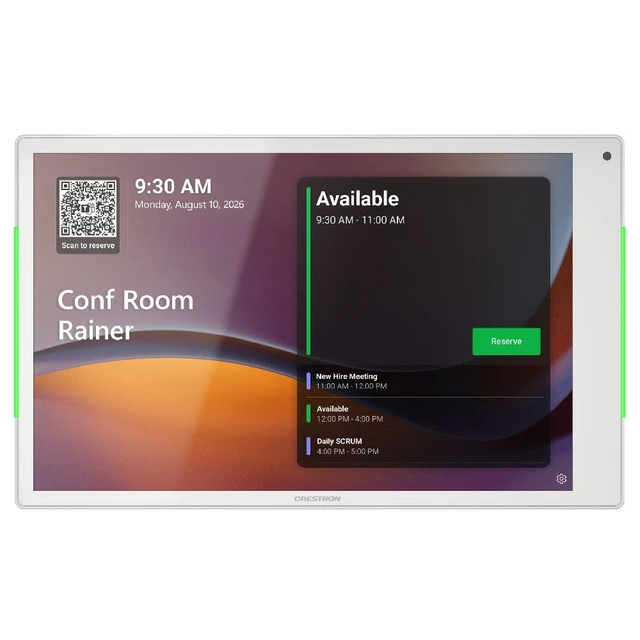
As part of a complete enterprise solution, the TS-1080 serves as a room booking interface through the Crestron Room Scheduling app. If desired, a room can be reserved on the spot for an ad hoc meeting. A CEN‑ODT‑C‑POE occupancy sensor can also be paired to the touch screen, allowing for occupancy status to be reported instantly to the scheduling app for no shows and unscheduled room usage.
Running the Crestron Scheduling App, the TS-1080 integrates directly with Microsoft Exchange Server® software (for users of Outlook® software and Microsoft 365® software), the Google Calendar™ calendaring app (including G Suite™ software), CollegeNET® 25Live® scheduling software, or Ad Astra™ software.
Third-Party Scheduling Apps
The TS-1080 also includes support for various third-party scheduling applications. New providers are made available via firmware updates. Whatever provider you choose, setup is as simple as connecting the touch screen to the network and choosing an app from the built-in setup screens. The selected app downloads from the cloud and installs on the touch screen without any programming or control system required.
Zoom Rooms Controller
The Zoom Rooms® Controller conferencing control application enables the touch screen to be used as a touch screen control panel for a Zoom Rooms software-based conferencing and collaboration solution. The touch screen offers a superior alternative to a consumer tablet device, providing a more reliable and secure platform with versatile, streamlined mounting options.
Crestron Home OS Control
The TS-1080 is used to control a Crestron Home® OS whole home solution. Select the Crestron Home app from the touch screen to control lighting, shades, climate, media, security, and cameras, including the ability to create and recall scenes that create a desired ambiance throughout a home. A TS-1080 may be installed in each room to provide easy access to various Crestron Home functions for both the room and the home.
Web Browsing
Using its built in web browser, the TS-1080 provides access to online program guides and other web-based services, and it can be used to control DVRs and other devices without having to pick up a tablet or smartphone.
Wired and Wi-Fi Connectivity
An Ethernet LAN connection is all that is required to wire the TS-1080, containing all control, video, intercom, and power signals within a single wire. For deployments without access to Ethernet, the touch screen can also be connected to the network over Wi-Fi communications via a local wireless access point (WAP).
Power over Ethernet
Using PoE technology, the TS-1080 gets its operating power directly through the network cable. PoE (Power over Ethernet) eliminates the need for a local power supply or any dedicated power wiring. Crestron PoE switches offer a total networking solution with built in PoE for multiple touch screens.
SCEP Certificate Management
80 Series touch screens support Simple Certificate Enrollment Protocol (SCEP) and Enrollment over Secure Transport (EST) to automate certificate enrollment, issuance, and renewal across enterprises. SCEP provides fast and standardized certificate authentication with simple renewal capabilities and can be managed through the console, local web UI, and XiO Cloud.
NOTE: The touch screen must run firmware version 1.6 or greater in order to use SCEP/EST certificate management.
Enterprise-Grade Security
Crestron touch screens employ enterprise-grade networking with robust security features such as 802.1X authentication, MDEP, TLS encryption, HTTPS connectivity, and Active Directory® service integration. These features are imperative to protect your network against service interruptions and malicious intrusions, and to ensure compliance with your organization’s network policies. Cloud based provisioning and management streamlines the process of configuring, monitoring, and updating every touch screen on the network. Additional support for SNMP allows the touch screen to be monitored by your IT administrator.
XiO Cloud Service
The TS-1080 is compatible with the XiO Cloud® service, which is an IoT (Internet of Things) based platform for remotely monitoring and managing Crestron devices across an enterprise or an entire client base. Built on the Microsoft® Azure® software platform and utilizing Microsoft's industry leading Azure IoT Hub technology, XiO Cloud enables installers and IT managers to deploy and manage thousands of devices simultaneously. Unlike other virtual machine based cloud solutions, Azure services provide unlimited scalability to suit the ever growing needs of an enterprise.
Key Features
- Next generation Crestron tabletop touch screen
- 10.1 in. (257 mm) widescreen active-matrix color display and 1920x1200 WUXGA display resolution
- Capacitive touch screen display
- Custom-programmable virtual control buttons
- Supports Crestron HTML5 software custom user projects
- Built-in Rava® SIP intercom
- Built-in speakers and microphone
- H.265, H.264, or MJPEG streaming video display
- Native apps for Crestron Home® OS and various room scheduling services
- Built-in web browsing
- Single wire Ethernet connection with PoE or PoE+ power
- Wi-Fi® network connectivity
- USB-C 2.0 port for room availability accessories
- Enterprise grade security and authentication
- Web, cloud, or device-based configuration
Technical Specifications
- Touch Screen Display
- Display Type: TFT active matrix color LCD
- Size: 10.1 in. (257 mm) diagonal
- Aspect Ratio: 16:10 WXGA
- Resolution: 1920 x 1200 pixels
- Brightness:
- Minimum: 350 nits (cd/m2)
- Maximum: 400 nits (cd/m2)
- Contrast: 1000:1
- Color Depth: 24 bit, 16.7M colors
- Illumination: Edgelit LED with auto brightness control
- Viewing Angle: ±80° horizontal, ±80° vertical
- Touch Screen: Projected capacitive, 5 point multitouch capable
- Buttons
- Virtual Buttons: (6) Virtual buttons in collapsible universal tool bar, per button show/hide, preconfigured with icons for Power, Home, Lights, Up, Down, and Microphone
- Reset: (1) Pin hole on rear for hardware reset
- Graphics Engine: Crestron HTML5 multilanguage web browser1, multilanguage onscreen keyboard, screensaver, dual scalable streaming video window, native room scheduling applications, native Crestron Home® OS app, touch screen setup and diagnostics via web browser, cloud, or onscreen UI
- Room Scheduling Support
- Crestron Scheduling App: Microsoft Exchange Server® and Microsoft 365® software, Google Calendar™ calendaring app and G Suite™ software, CollegeNET® 25Live® software, and Ad Astra™ software
- Third-Party Apps: Includes support for various third-party scheduling applications.
- Memory
- RAM: 8GB LPDDR4
- Storage: 40GB eMMC pSLC
- Maximum Project Size: 1000 MB
- Wired Communications
- Ethernet: 1000Mbps, autoswitching, autonegotiating, autodiscovery, full/half duplex, TCP/IP, UDP/IP, CIP, DHCP, SSL, TLS, SSH, SFTP (SSH File Transfer Protocol), IEEE 802.1X, SNMP, IPv4 or IPv6, Active Directory® service authentication, HTTPS web browser setup, XiO Cloud® client, IEEE 802.3 at compliant
- USB: USB 2.0 host for room scheduling accessories
- Wireless Communications
- Transceiver: IEEE 802.11a/b/g/n/ac/ax Wi-Fi 6E (2.4, 5 GHz and 6GHz) 2x2 MIMO, static IP or dynamic IP via DHCP
- Security: 64 and 128-bit WEP, WPA, WPA2, WPA3, WPA Enterprise and WPA2 Enterprise
- Range: Up to 50 ft (15 m), subject to site-specific conditions
- Bluetooth® Hardware: BLE, BT5.2, 33 ft (10 m) typical range
- Radio Frequency (RF) signals:
- Proximity sensor (Japan): 60.5 to 61 GHz
- Proximity sensor (Worldwide): 61 to 61.5 GHz
- Streaming Decoder
- Video Formats: H.265, H.264 (MPEG‑4 part 10 AVC, MJPEG)
- Audio Formats: AAC Stereo
- Bitrates: Up to 25 Mbps (20 Mbps maximum recommended)
- Input Resolutions: Up to 3840x2160@30fps
- Protocol: RTSP
- Audio
- Features: Built-in microphone and speakers, Rava® SIP Intercom
- Connectors
- LAN PoE:
- (1) 8-pin RJ-45 connector, female, with 2 LED indicators; 1000BASE-TX Ethernet port
- PoE+ PD port
- Green and yellow LEDs indicate Ethernet port status
- USB:
- (1) USB Type C connector, female
- USB 2.0 host port
- USB 3.1 DisplayPort Alt Mode (for future release)
- LAN PoE:
- Power
- PoE (Power over Ethernet):
- IEEE 802.3at Type 2 compliant PoE+ PD (Powered Device)
- Requests 30 W (PoE+ Class 4) from an 802.3at Type 2 PSE without LLDP
- Requests 15.4 W (PoE Class 0) from an 802.3af (or 802.3at Type 1)
- Note: Enabling the USB port requires use of an 802.3 at Type 2 PoE+ PSE.
- PoE (Power over Ethernet):
- Environmental
- Temperature: 32 to 104°F (0 to 40°C)
- Humidity: 10% to 95% RH (noncondensing)
- Heat Dissipation: 44 BTU/hr
- Construction
- Housing: Die-cast housing, smooth black or white finish, glass with black or white surround
- Dimensions
- Height: 4.88 in. (124 mm)
- Width: 9.68 in. (245 mm)
- Depth: 4.53 in. (115 mm)
- Weight: 2.23 lb (1012 g)
- Product Type:
- Video Conferencing
- Features:
- UC, Zoom & Others
Related Products
-
-

-
-

Crestron
Crestron 10.1" Room Scheduling Touch Screen Smooth Includes Light Bar (Black)
SKU: TSS-1070-B-S-LB KIT